Energy ⚡ Label Generator
A JavaScript/TypeScript library for generating EU-compliant energy labels as SVG, in Node.js and in the browser.






Class Arrow

import { renderClassArrow } from 'energy-label'
const svgString = renderClassArrow('A', { labelOrientation: 'LEFT' })
Smartphone Label
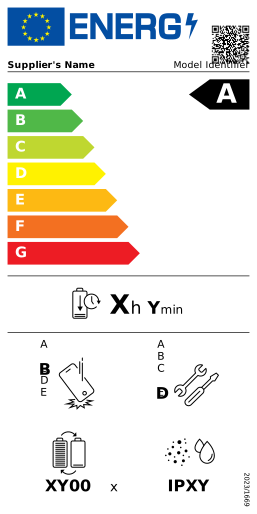
import { renderSmartphonesLabel } from 'energy-label'
const svgString = renderSmartphonesLabel()
Features
- Generate SVG energy labels following official EU regulations.
- Use product data from EPREL as is: field names and units match the EPREL API.
- Zero runtime dependencies and compact SVG output.
- Tree-shakeable: bundle only the labels you use.
- Works in both Node.js and modern browsers, synchronously.
- Supports flags for both European Union (🇪🇺) and Great Britain (🇬🇧) markets.
- Typed data for each template in TypeScript.
- Compatible with any JavaScript framework, including React, Vue, Svelte, Angular, and more.
It is currently available for smartphones and tablets, refrigerating appliances (household fridges and freezers, and wine storage appliances) and class arrows. More templates will be added gradually.
Installation
npm install energy-label
See our documentation for more installation methods.
Basic Usage
Node.js
You can generate an energy label and save it as an SVG file using Node.js:
import { EnergyLabel } from 'energy-label'
import fs from 'node:fs'
const label = new EnergyLabel('smartphones')
const svgString = label.toString()
fs.writeFileSync('smartphone-label.svg', svgString)
Missing fields are shown as placeholders (such as XYZ), so you can preview a label before having all its data.
Using EPREL Data
The data fields use the same names and units as the EPREL public API, so a product's data can be passed as it comes. Fields the label doesn't need are ignored.
The EPREL API doesn't allow requests from browsers (CORS), so fetch the data on your server, as in this Node.js example:
import { createEnergyLabel } from 'energy-label'
const response = await fetch('https://eprel.ec.europa.eu/api/product/1573269')
const product = await response.json()
const label = createEnergyLabel('refrigerating-appliances', product)
const svgString = label.toString()
To fetch EPREL data from the browser, you can host eprel-api-proxy, a small proxy that forwards requests to the EPREL API and adds the CORS headers:
// Requests to the proxy are forwarded to https://eprel.ec.europa.eu/api
const response = await fetch(
'https://your-eprel-proxy.example.com/product/1573269',
)
const product = await response.json()
const label = createEnergyLabel('refrigerating-appliances', product)
Set CORS_ORIGIN to your site's origin so other sites can't use your proxy from their pages.
The data also decides the variant of the label: a refrigerating appliance with capBottles gets the wine storage label, and a freezer without a fridge compartment shows only the freezer capacity.
The QR code links to the product in EPREL, with the same URL as the official labels. Without eprelRegistrationNumber, it links to the product group page.
Browser
Create and Display an Energy Label
Display energy labels directly in web pages using HTML and JavaScript.
<!DOCTYPE html>
<html>
<head>
<title>Simple Energy Label</title>
</head>
<body>
<div id="label-container"></div>
<script type="module">
import {
createEnergyLabel,
appendTo,
} from 'https://esm.sh/energy-label'
const label = createEnergyLabel('smartphones')
const svgString = label.toString()
appendTo(document.getElementById('label-container'), svgString)
</script>
</body>
</html>
Download the Label as an SVG File
You can also download the label directly as an SVG file:
import { download } from 'energy-label'
const svgString = label.toString()
download(svgString)
// Or with a custom filename:
// download(svgString, 'my-energy-label.svg')
React
Labels are generated synchronously and their markup is deterministic, so they can be rendered on the server and on the client alike.
import { useMemo } from 'react'
import { createEnergyLabel } from 'energy-label'
export function EnergyLabel() {
const svgString = useMemo(
() =>
createEnergyLabel('smartphones', {
flagOrigin: 'EU',
supplierOrTrademark: 'Sultana',
modelIdentifier: '92COU8944VK',
eprelRegistrationNumber: '3712289',
energyClass: 'D',
batteryEndurancePerCycle: 4020,
repeatedFreeFallReliabilityClass: 'C',
repairabilityClass: 'E',
batteryEnduranceInCycles: 39,
ingressProtectionRating: 'IP14',
}).toString(),
[],
)
return (
<div>
<h2>Energy Label</h2>
{/* User-provided text is escaped when the label is generated. */}
<div dangerouslySetInnerHTML={{ __html: svgString }} />
</div>
)
}
Smaller Bundles
EnergyLabel, createEnergyLabel and createClassArrow choose the template by name, so they bundle all of them. If you only use one label, import its render function instead, which returns the SVG string and bundles only that label:
import { renderClassArrow } from 'energy-label'
const svgString = renderClassArrow('A', { labelOrientation: 'RIGHT' })
| Import | Minified + gzipped |
|---|---|
renderClassArrow |
1 KB |
renderRefrigeratingAppliancesLabel |
7 KB |
renderSmartphonesLabel |
8.3 KB |
createEnergyLabel (all labels) |
10.2 KB |
The class arrow is the lightest, as it has no header with the QR code.
Fonts
The regulations use Verdana and Calibri. Labels reference them by name with free fallbacks (DejaVu Sans and Carlito), so they look right on systems without those fonts, such as Linux servers.
Design Resources
You can access the Figma design files here:
Feedback
Feel free to provide any comments. All kinds of contributions are welcome 🚀.
License
MIT License © 2025 Marc Mariné