Energy ⚡ Label Generator
A JavaScript/TypeScript library for generating EU-compliant energy labels as SVG files in Node.js.






🖼️ Example
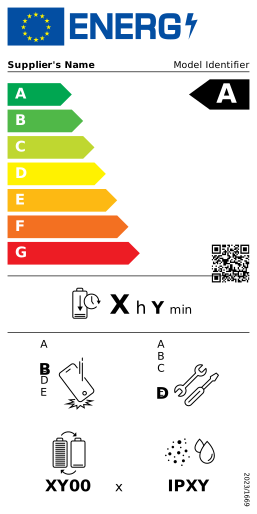
Features
- Generate SVG energy labels following official EU regulations.
- Works in both Node.js and modern browsers.
- Supports flags for both European Union (🇪🇺) and Great Britain (🇬🇧) markets.
- Compatible with any JavaScript framework, including React, Vue, Svelte, Angular, and more.
- Easily embeddable in websites, SPAs, CMSs, or static pages.
It is currently available for smartphones and tablets, refrigerators and arrow labels. More templates will be added gradually.
Installation
npm install energy-label@beta
See our documentation for more installation methods.
Basic Usage
This library is in the early stages of development, so breaking changes are possible.
Node.js
You can generate an energy label and save it as an SVG file using Node.js:
import { EnergyLabel } from 'energy-label'
import fs from 'node:fs'
const label = new EnergyLabel('smartphones')
const svgString = label.toString()
fs.writeFileSync('smartphone-label.svg', svgString)
Browser
Create and Display an Energy Label
Display energy labels directly in web pages using HTML and JavaScript.
<!DOCTYPE html>
<html>
<head>
<title>Simple Energy Label</title>
</head>
<body>
<div id="label-container"></div>
<script type="module">
import { createEnergyLabel, appendTo } from 'https://esm.sh/energy-label@beta'
const label = createEnergyLabel('smartphones')
const svgString = label.toString()
appendTo(document.getElementById('label-container'), svgString)
</script>
</body>
</html>
Download the Label as an SVG File
You can also download the label directly as an SVG file:
const svgString = label.toString()
download(svgString)
// Or with a custom filename:
// download(svgString, 'my-energy-label.svg')
React
This example uses React to generate and render an energy label in the DOM.
import { useEffect, useRef } from 'react'
import { createEnergyLabel, appendTo } from 'energy-label'
export function EnergyLabel() {
const containerRef = useRef<HTMLDivElement>(null)
useEffect(() => {
;(() => {
if (!containerRef.current) return
const label = createEnergyLabel('smartphones', {
flagOrigin: 'EU',
supplierOrTrademark: 'Sultana',
modelIdentifier: '92COU8944VK',
eprelRegistrationNumber: '3712289',
energyClass: 'D',
batteryEndurancePerCycle: 4020,
repeatedFreeFallReliabilityClass: 'C',
repairabilityClass: 'E',
batteryEnduranceInCycles: '3900',
ingressProtectionRating: 'IP14'
})
const svgString = label.toString()
appendTo(containerRef.current, svgString)
})()
}, [])
return (
<div>
<h2>Energy Label</h2>
<div ref={containerRef} />
</div>
)
}
Design Resources
You can access the Figma design files here:
Feedback
Feel free to provide any comments. All kinds of contributions are welcome 🚀.
License
MIT License © 2025 Marc Mariné